Project risk becomes real when you can see it, score it, assign it, and act on it inside actual project work. The best tools for students do not just organize tasks; they train you to spot uncertainty early, connect it to deadlines and owners, and keep updating decisions as the project changes.
If you want students to build real project judgment, the strongest tools are the ones that make risk visible in everyday planning, reporting, and execution. This guide covers eight tools that do that well, why each one matters, where each one fits, and how you can choose the right option for coursework, capstones, team assignments, and career-ready project practice.
1. Atlassian Confluence And Jira
Atlassian Confluence and Jira sit at the top because they teach one of the most important lessons in project work: risk is not a side note. It belongs inside the same system where you track tasks, deadlines, blockers, ownership, and status. When students log a risk in a structured register, connect it to work items, and revisit it during updates, they start thinking like real project teams instead of assignment trackers.
This pairing is especially useful when you want students to understand the full cycle of project risk management. A risk register in Confluence can capture the risk description, probability, impact, response plan, owner, due date, and current status. Jira then turns those decisions into action by linking mitigation tasks, escalation steps, and delivery changes to the live project board.
That matters in classroom projects because many students identify risk once and then never revisit it. With these tools, you can build a repeatable operating rhythm. A team can review open risks during weekly check-ins, update mitigation plans when conditions shift, and mark whether the risk is active, reduced, transferred, accepted, or closed.
You also get workplace relevance. Students who learn structured documentation and issue tracking through Atlassian products build habits that transfer well into internships, operations teams, software projects, product work, and cross-functional delivery roles. If your goal is to teach risk as a living process rather than a one-time worksheet, this is one of the strongest combinations available.
Confluence and Jira are not the easiest tools on this list for first-time users. The learning curve is real, and some student teams may need setup support. Still, that setup effort pays off because the tools force discipline, and discipline is what turns vague concern into measurable project control.
2. Miro
Miro earns a place near the top because it makes risk visible fast. Students often struggle with abstract terms like probability, impact, exposure, mitigation, and residual risk until they can place them on a visual board and debate them together. Miro is excellent for that kind of collaborative decision-making, especially in workshops, sprint planning, design reviews, and project kickoff sessions.
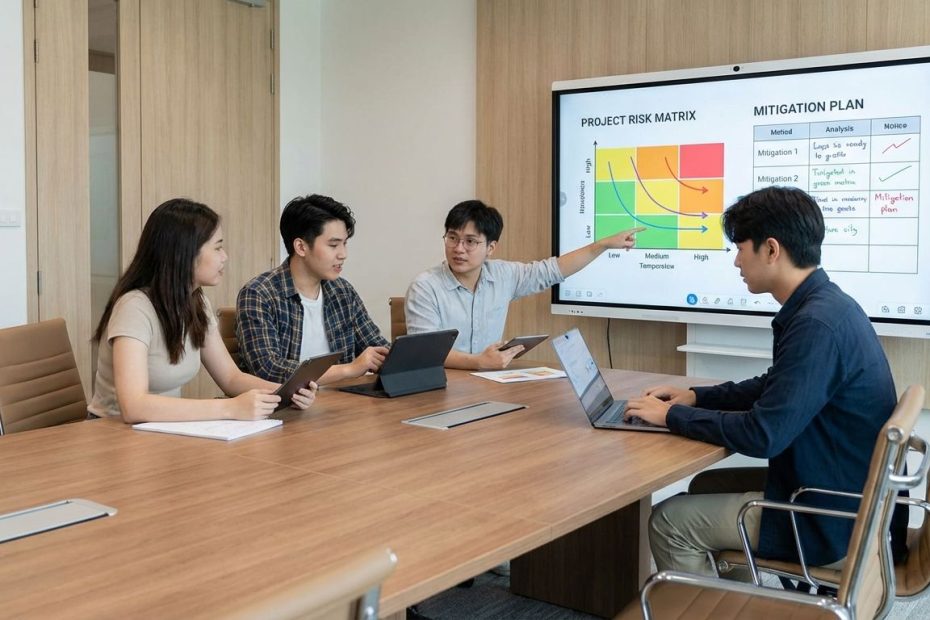
A risk matrix works well in Miro because it turns discussion into prioritization. When a team places one risk in a low-impact area and another in a high-probability, high-impact area, the group is forced to explain the difference. That discussion sharpens judgment. It also helps students learn that not every risk deserves the same level of attention, reporting, or mitigation effort.
Miro is also useful when you want students to move beyond passive templates. A board can hold sticky notes for risk causes, warning signs, triggers, contingency actions, dependencies, and owner handoffs. That gives you a live workspace for risk review sessions where teams refine their thinking instead of filling out static cells in silence.
The main limitation is depth. Miro is outstanding for visual planning and collaborative scoring, but it is not the strongest system for long-term tracking on its own. If you rely on it alone, teams may run great workshops and still lose follow-through later. That is why Miro works best when paired with a task or documentation tool where the final decisions live and get updated over time.
For teaching, though, Miro is hard to beat at the moment when students need to understand risk prioritization. It turns uncertainty into something visible, discussable, and actionable. That is often the fastest way to move students from vague concern to clear judgment.
3. Asana
Asana is one of the best tools for teaching how risk affects execution. Many student teams can list problems, but they do not always know how to convert those problems into status updates, owner accountability, milestone changes, or follow-up tasks. Asana closes that gap well because it connects project tracking with reporting and ongoing coordination.
When you build a project in Asana, you can translate a risk into a task, subtask, dependency, milestone shift, comment trail, or progress update. That makes risk management less academic and more operational. A delayed vendor response, unclear project scope, missed approval, or staffing gap becomes a visible item with someone assigned to resolve it.
Asana also supports a valuable teaching habit: regular project communication. Students often underestimate how much project control depends on clear reporting. Dashboards, status updates, milestone tracking, and progress reporting help teams explain what is off track, what might slip next, and what decision needs attention now. That reporting habit is central to real-world project delivery.
Another advantage is usability. Asana is cleaner and more approachable than some heavier project systems, which lowers the barrier for student teams who need to learn quickly. If your course includes group projects, consulting-style assignments, client work, or capstone delivery, Asana gives students a practical way to connect risk signals to ongoing work without overwhelming them.
Its weakness is that it is not a specialized risk platform. Students still need a simple method for logging probability, impact, response actions, and ownership in a consistent format. Once that structure is added, Asana becomes a strong environment for showing how risk decisions shape day-to-day execution.
4. ClickUp
ClickUp works well for students who need flexibility. It supports multiple views, including lists, boards, timelines, dashboards, documents, forms, and whiteboards, which helps teams see the same project from several angles. That matters in risk management because one risk can show up as a schedule issue in one view, a workload issue in another, and a reporting issue somewhere else.
From a teaching standpoint, ClickUp is strong because it can hold structured risk data and execution data in the same workspace. You can build a custom list for risks, add fields for probability and impact, assign owners, set due dates for mitigation work, and create dashboards that highlight overdue actions or rising problem areas. That gives students a more active understanding of risk than a spreadsheet alone.
It also suits mixed project styles. Some student teams think visually and prefer boards. Others want tables, workload views, or Gantt-style planning. ClickUp lets you support different working styles without moving the team into separate tools. That flexibility can improve adoption, especially in multidisciplinary student groups where one format never fits everyone.
The caution is complexity. ClickUp can do a lot, and that can pull student teams into endless customization if the instructor or team lead does not define a simple operating model. You want the tool to support decisions, not become the assignment. The best use is to set a lean risk workflow, establish required fields, and keep the review rhythm consistent.
When configured well, ClickUp teaches a valuable lesson: risk control improves when information flows across planning, tracking, communication, and execution. Students who learn that principle will carry it into later project environments with far less adjustment.
5. Airtable
Airtable is an excellent bridge between spreadsheets and operational systems. Many students are comfortable with rows and columns, yet they need something more structured than a basic sheet once projects start carrying dependencies, owner handoffs, status fields, and live updates. Airtable fills that gap well by keeping the familiarity of a table while adding the discipline of a database.
That structure is useful for risk management. You can create fields for risk category, description, trigger, owner, impact score, probability score, mitigation action, review date, and current status. Once those fields are in place, students can sort, filter, group, and report risks with much more control than a standard spreadsheet usually provides.
Airtable also helps students understand relationship mapping. A risk record can connect to a project phase, deliverable, team member, issue log, or mitigation task. That creates a stronger mental model of how risk moves through real work. Students stop seeing risk as an isolated list and start seeing it as part of delivery, resource planning, and decision timing.
This tool is especially strong for research teams, event planning groups, operations projects, student organizations, and capstone work where many moving parts need structured oversight. It can support lightweight reporting without forcing teams into enterprise-grade complexity. That balance is a major advantage in education settings where time is limited and tool adoption has to be fast.
The main drawback is that students can treat Airtable like a prettier spreadsheet if no process is attached to it. To get full value, you need a review cadence, clear ownership rules, and a scoring method that everyone uses the same way. Once that discipline is in place, Airtable becomes one of the most effective risk-tracking tools in student project work.
6. monday.com
monday.com stands out because it combines accessibility with strong student value. Its student access offering makes it appealing for universities and student teams that want exposure to workplace-style project software without a large budget barrier. That alone gives it a practical edge in higher education, where adoption often depends on cost as much as function.
The platform itself is useful for risk navigation because it makes project status easy to read. Students can track tasks, owners, due dates, blockers, and updates in one place, then build custom boards that include risk items, mitigation tasks, escalation flags, and review checkpoints. When risk is visible inside the same workspace as delivery tracking, teams are more likely to act on it.
monday.com also works well for teaching accountability. A student can own a task, a risk, a mitigation action, or a follow-up item, and that ownership is visible to the team. That transparency matters because many project risks worsen when everyone notices the problem but no one is clearly responsible for moving the response forward.
Another strength is ease of use. Compared with some more technical systems, monday.com is quick to set up and approachable for non-technical teams. That makes it suitable for classroom projects in business, marketing, communications, design, event planning, and nonprofit work, where students need organized coordination more than advanced engineering workflows.
Its limitation is that you still need to define your risk method clearly. The tool can support good risk practice, but it does not replace the need for scoring criteria, review routines, and response planning. Once those rules are in place, monday.com becomes a strong teaching environment for turning visible work management into visible risk control.
7. Trello
Trello remains one of the easiest ways to introduce students to structured project work. Its board-and-card format is simple, fast, and familiar, which reduces resistance for teams who are new to project management software. That simplicity matters when your first goal is getting students to track work consistently rather than memorizing advanced methodology.
For risk teaching, Trello is useful when you want students to understand workflow exposure early. A blocked card, overdue approval, stalled dependency, or overloaded team lane can signal risk before a formal register is updated. That teaches an important operational truth: project risk often shows up first in work flow, not in polished reports.
You can also create a dedicated risk board or a risk list inside the main project board. Cards can represent individual risks, with labels for severity, checklists for mitigation actions, assigned members for ownership, and due dates for review. For introductory courses or short-term student projects, that setup may be enough to build solid habits without creating too much administrative weight.
The downside is depth. Trello is weaker than the higher-ranked tools when you need detailed scoring, more advanced reporting, richer dashboards, or formal documentation tied to complex delivery work. It can support structured thinking, but it does not naturally push teams toward the same level of rigor as a dedicated register plus execution platform.
That said, Trello still deserves its place on this list because ease of use is not a minor detail in education. A tool students will actually maintain often teaches more than a stronger tool that teams abandon after the first week. If the goal is early adoption, visible flow, and basic risk discipline, Trello is a solid entry point.
8. Excel And Google Sheets
Excel and Google Sheets still matter because fundamentals matter. A spreadsheet may not look exciting beside modern work-management platforms, yet it remains one of the clearest ways to teach the core mechanics of a risk register. Students can see every field, every score, every owner, and every status update in one place without any hidden automation or system complexity.
This simplicity is useful in teaching. When students build a register manually, they understand what each field does and why it matters. They learn how to write a risk clearly, score probability and impact, define a mitigation plan, assign an owner, set a review date, and update status over time. That foundation makes every later tool easier to understand.
Google Sheets adds collaboration, which helps student teams maintain a shared log during group projects. A live spreadsheet can support weekly reviews, comments, color-coded scoring, filtering by owner, and quick sorting by severity. That is often enough for academic teams working on research projects, case competitions, operations assignments, or event delivery plans.
The weakness is disconnection. Spreadsheets tend to drift away from the live project unless someone deliberately connects the register to tasks, meetings, and decisions. Students may fill out the file for an assignment grade and never use it again. That is why sheets work best as a foundational tool or as a lightweight option for teams with limited software access.
Still, no serious discussion of student risk tools should ignore spreadsheets. They remain one of the best ways to teach first principles cleanly. If you want students to understand the logic of risk before they move into more advanced systems, Excel and Google Sheets are still worth teaching well.
How You Should Choose The Right Tool For Student Project Risk Management
The best choice depends on what you need students to learn. If the priority is formal risk documentation and workplace-ready process, Atlassian Confluence and Jira are strong picks. If the goal is visual discussion and fast team alignment, Miro stands out. If you want execution, reporting, and easy adoption, Asana and monday.com are strong options. If you need flexibility and custom views, ClickUp fits well. If you want database-style structure, Airtable is a smart choice. If ease and speed matter most, Trello and Google Sheets still hold value.
You also need to match the tool to project maturity. Early-stage student teams often need a simple register and clear ownership rules more than advanced dashboards. More mature teams can benefit from linked workspaces, automations, and reporting layers. If you push too much complexity too early, students spend more time managing the tool than managing the risk.
Another factor is transfer value. Some tools teach methods that map directly to modern workplace systems, which can help students build useful software fluency before internships or entry-level roles. That does not mean a simple tool is a poor choice. It means the tool should fit the learning objective instead of chasing feature volume.
The strongest teaching model is usually simple: make risk visible, assign ownership, review it on a schedule, and connect it to active work. Any tool that supports those habits can improve student decision-making. The right platform is the one your team will maintain with discipline.
What Students Actually Learn From These Tools
Students do not just learn software when they use these tools well. They learn how to identify weak signals before they become missed deadlines, budget overruns, quality failures, or team bottlenecks. They learn that uncertainty has to be named, ranked, owned, and reviewed. That is a practical management skill, not just classroom vocabulary.
They also learn communication. A good risk process forces students to explain what could go wrong, why it matters, what action is planned, who owns it, and when the team will review it again. That is the same discipline expected in professional project environments where vague concern is not enough and silent assumptions create avoidable problems.
Most importantly, they learn adaptation. Real projects change. Tools that keep risk visible inside active work help students see that plans are not fixed documents. They are operating systems that need regular adjustment. That habit will serve them long after the class grade is posted.
What Is The Best Tool For Teaching Students Project Risk Management?
- Best overall: Atlassian Confluence and Jira for structured risk tracking tied to live work
- Best visual option: Miro for risk matrices and team workshops
- Best easy-to-use execution tool: Asana
- Best beginner option: Trello or Google Sheets
Equip Students To Manage Real Project Risk
If you want students to handle real projects with confidence, teach them in tools that make uncertainty visible and actionable. The strongest options on this list train students to log risks, prioritize them, assign ownership, monitor changes, and connect decisions to real work instead of isolated theory. A spreadsheet can teach the basics, a visual board can sharpen prioritization, and a full work-management platform can show how risk shapes execution every day. The right choice depends on your learning goal, budget, and project complexity, but the standard stays the same: the tool must help students move from awareness to action. When that happens, they do not just complete assignments more effectively; they build the judgment that real project teams depend on.

Clifford “Cliff” Boro is a veteran entrepreneur and Managing Partner at TurnTide Holdings, with over 30 years of experience in venture-backed startups, hedge funds, and early-stage technology. He specializes in guiding tech companies from launch to exit and has been nationally recognized for his leadership and innovation.